
Part IV – Fixing the Mess
When the 10g installer completes you will have an Oracle 10g install, a Clusterware Service and no database.
With the logical 32GB partition now stamped for ASM, it is now possible to use DBCA to create a new empty database, and DBCA will allow you to specify ASM as the storage medium, whereupon DBCA will also create the ASM instance for you.
However by default on Windows 7 this process will fail, with errors in the Clusterware Service.
Oracle’s documentation suggests that you use the “localconfig add” tool in the Oracle Home bin directory to remove and reinstall the Clusterware service. Again on Windows 7 this does not work:
C:\oracle\product\10.2.0\db_1\BIN> localconfig add
 Step 1: creating new OCR repository
 Successfully accumulated necessary OCR keys.
 Creating OCR keys for user 'administrator', privgrp ''..
 Operation successful.
 Step 2: creating new CSS service
 Failed to create the new CSS service, err(1073)
 failed to create CSS services
Trying to delete and re-add the service fails with similar problems.
To solve this problem on Windows 7, we need to adjust the permissions and compatibility of a program called ocssd.exe in the Oracle Home bin directory. It is this program that creates the Clusterware service and it is not designed for Windows 7.
To address the problem, find the ocssd.exe program and right click on it. Then select the “Compatibility” tab and set it to Windows XP (Service Pack 2). We must also set it explicitly to “Run as Administrator”
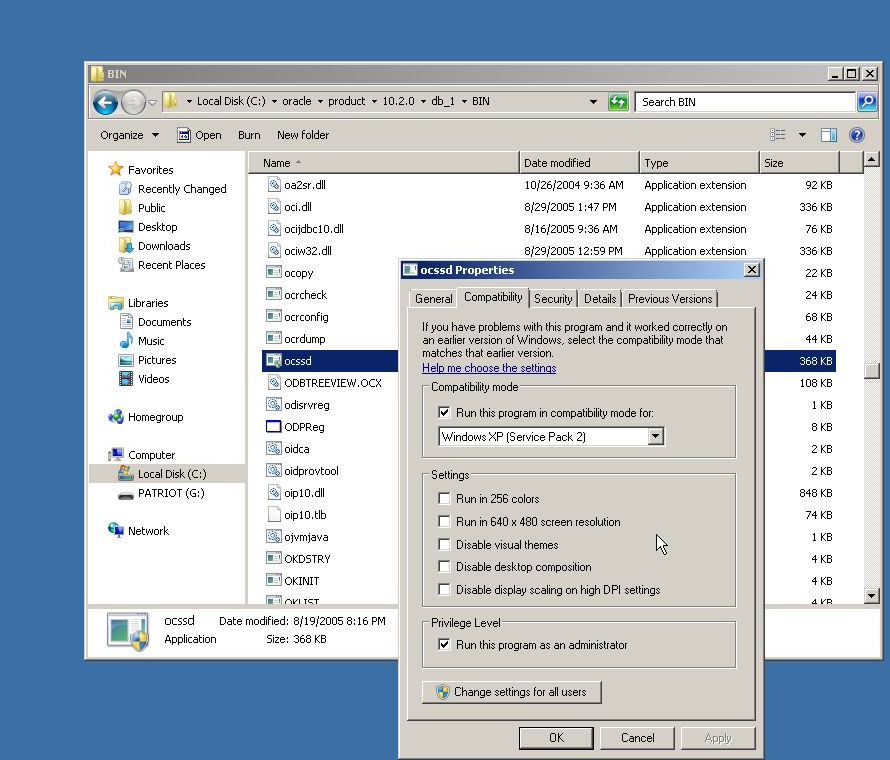
Once this is done we can delete the Clusterware service using the localconfig tool, in this example we shut down the service first
C:\oracle\product\10.2.0\db_1\BIN>net stop OracleCSService
The following services are dependent on the OracleCSService service.
Stopping the OracleCSService service will also stop these services.
OracleServiceGCTDEV
OracleASMService+ASM
Do you want to continue this operation? (Y/N) [N]: y
The OracleServiceGCTDEV service is stopping.
The OracleServiceGCTDEV service was stopped successfully.
The OracleASMService+ASM service is stopping.
The OracleASMService+ASM service was stopped successfully.
The OracleCSService service was stopped successfully.

C:\oracle\product\10.2.0\db_1\BIN>localconfig delete
Step 1: stopping local CSS stack
Step 2: deleting OCR repository
failed to open the OCR subkey, err(1060)
failed to cleanup local OCR repository
successfully deleted local CSS setup
We can now re-install the service with the proper compatibility and privilege level:
C:\oracle\product\10.2.0\db_1\BIN>localconfig add
 Step 1: creating new OCR repository
 Successfully accumulated necessary OCR keys.
 Creating OCR keys for user 'phred', privgrp ''..
 Operation successful.
 Step 2: creating new CSS service
 successfully created local CSS service
 successfully added CSS to home
We can now use DBCA to create new databases and set them to use ASM as their storage!
 the gruffdba