
In this post, we are going to install the DD Boost module for Oracle RMAN.
DD Boost is an optional module that works with Data Domain and a number of applications and databases, including Oracle. DD Boost moves some of the sophisticated deduplication process from the Data Domain appliance to the database server, resulting in a dramatic reduction in network bandwidth and backup times.
A greater than fifty percent reduction in backup times for a full level zero RMAN backup is typical when switching to DD Boost although as always, your mileage may vary.
Before we can use DD Boost for Oracle RMAN, we need to do two things:
- Enable Boost on the Data Domain appliances
- Install the Oracle RMAN MML library for DD Boost
First, we will log into the Data Domain, and make sure DD Boost is enabled and configured.
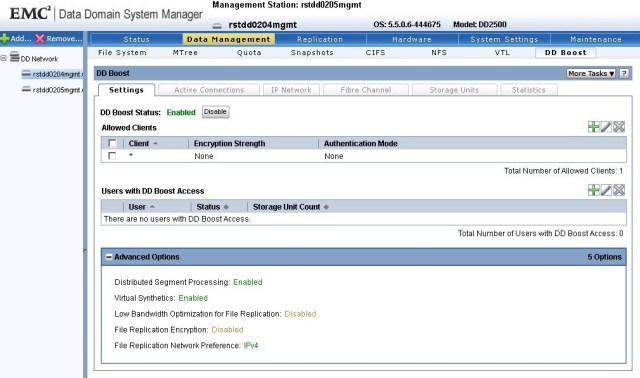
Log into Data Domain and select the Data Management tab, and then select the DD Boost sub-tab. The DD Boost Status shows us that the Boost system is enabled. DD Boost is a licensed option that must be enabled before use.
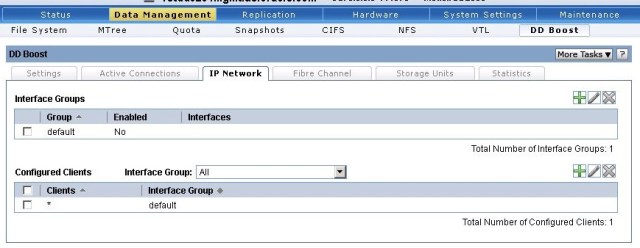
DD Boost not only has to be licensed and enabled, but we must also define an IP Network that DD Boost will use. Select the IP Network tab and then click the green plus symbol to add an Interface Group.
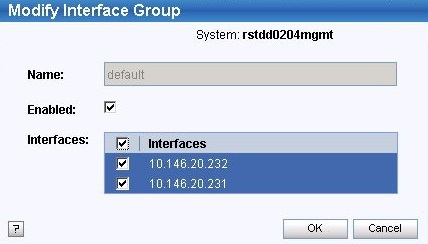
Add the available interfaces to the Interface Group and press OK.
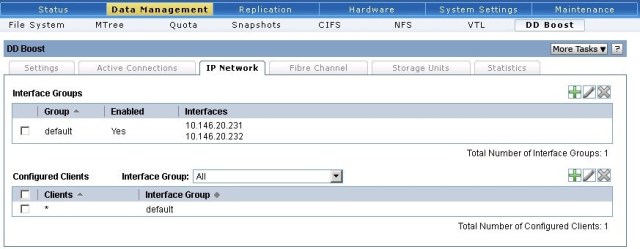
Once the Interface Group and Clients are configured the IP Network tab should look like this:
Next we need to define a storage unit for DD Boost to use.
Click on the Storage Units tab, and then click the green plus symbol to add a storage unit.
Choose a name for the new storage unit. In this case we named our storage unit dd0205_boost.
We also need to assign the new storage unit to a user which we can create at this time.
I have called the new user ddboostora, and given it the same password as username as this is a development/lab system.
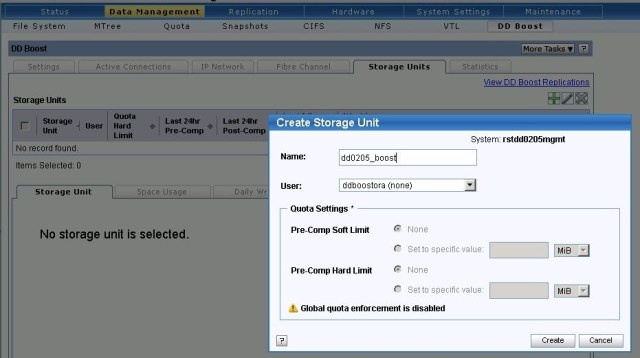
The Data Domain will now create the storage unit and the new user.
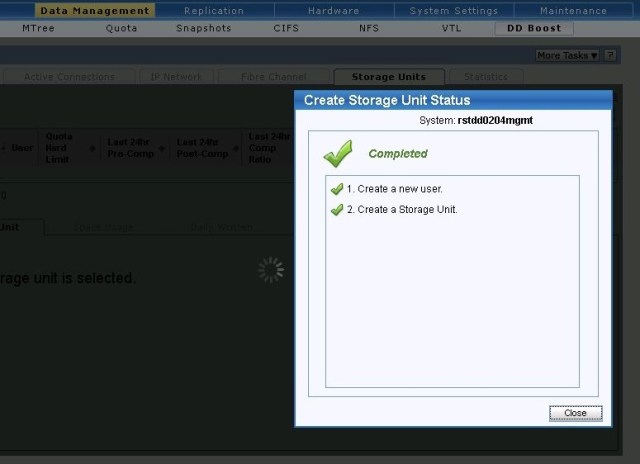
Now that the storage unit is created, we can click the View DD Boost Replications to set up replication for the DD Boost storage unit. This will take us to the Replication Summary tab, where we can select the Create Pair button.
Set the replication to another Data Domain and name the storage unit on the replica side. The storage unit will be created, so you cannot replicate to an existing storage unit.
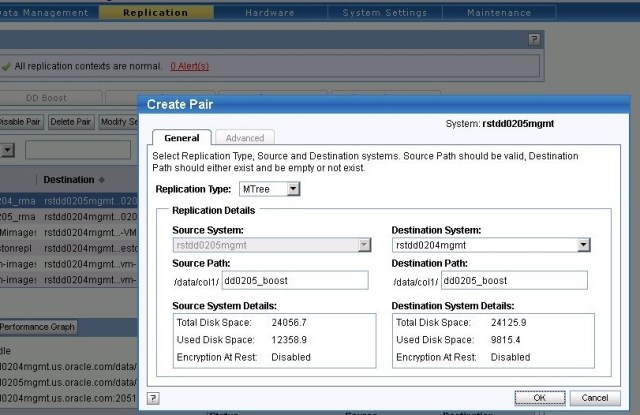
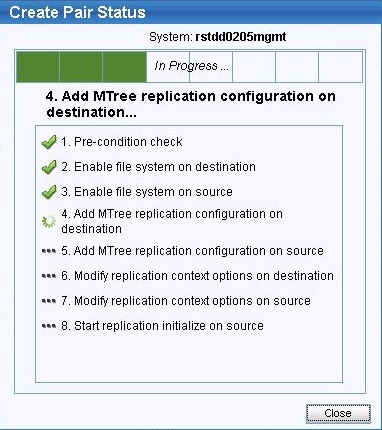
Press OK and the Data Domain will now create the replication pair.
Following the same procedure as shown in Using Data Domain as a backup target for RMAN, we can add NFS exports for the DD Boost storage units.
These exports are not writable, and the files they contain are not usable as substitutes for disk based RMAN backupsets as Oracle uses a different format, but these read-only NFS exports will allow the DBA to visually inspect the files that RMAN created, and verify that Data Domain replicated them from the source to the targets.
Add the NFS exports to the /etc/fstab files on all Oracle servers where you expect to run DD Boost.
[root@rstemc64vm23 ~]# cat /etc/fstab
#
# /etc/fstab
# Created by anaconda on Fri Aug  1 10:31:36 2014
#
# Accessible filesystems, by reference, are maintained under '/dev/disk'
# See man pages fstab(5), findfs(8), mount(8) and/or blkid(8) for more info
#
/dev/mapper/vg_rstemcvm06-lv_root /                       ext4    defaults        1 1
UUID=f3b39de2-e180-4072-958a-083f09f6e947 /boot                   ext4    defaults        1 2
/dev/mapper/vg_rstemcvm06-lv_home /home                   ext4    defaults        1 2
UUID=b484a41f-14f3-4f35-a10e-6f753d8c3e54 swap                    swap    defaults        0 0
tmpfs                   /dev/shm                tmpfs   defaults        0 0
devpts                  /dev/pts                devpts  gid=5,mode=620  0 0
sysfs                   /sys                    sysfs   defaults        0 0
proc                    /proc                   proc    defaults        0 0
rstnetapp:/vol/stage    /oracle_software        nfs     defaults,noauto 0 0
rstemcstage:/emcstage   /nfs_mount/emc_software           nfs     defaults,noauto 0 0
/dev/vg_u01/u01         /u01            ext4    defaults        1 2
#
# data domain nfs exports for dd0204 and dd0205
#
rstdd0205mgmt.emc.com:/data/col1/dd0205_rman      /nfs_mount/dd0205_rman         nfs     rw,bg,hard,nointr,tcp,vers=3,timeo=600,rsize=32768,wsize=32768,actimeo=0 0 0
rstdd0204mgmt.emc.com:/data/col1/dd0205_rman      /nfs_mount/dd0205_rman_rep     nfs     rw,bg,hard,nointr,tcp,vers=3,timeo=600,rsize=32768,wsize=32768,actimeo=0 0 0
rstdd0205mgmt.emc.com:/data/col1/dd0204_rman      /nfs_mount/dd0204_rman_rep     nfs     rw,bg,hard,nointr,tcp,vers=3,timeo=600,rsize=32768,wsize=32768,actimeo=0 0 0
rstdd0204mgmt.emc.com:/data/col1/dd0204_rman      /nfs_mount/dd0204_rman         nfs     rw,bg,hard,nointr,tcp,vers=3,timeo=600,rsize=32768,wsize=32768,actimeo=0 0 0
#
# data domain boost nfs exports for verification
#
rstdd0205mgmt.emc.com:/data/col1/dd0205_boost    /nfs_mount/rstdd0205_boost       nfs    rw,bg,hard,nointr,tcp,vers=3,timeo=600,rsize=32768,wsize=32768,actimeo=0 0 0
rstdd0204mgmt.emc.com:/data/col1/dd0205_boost    /nfs_mount/rstdd0205_boost_rep   nfs    rw,bg,hard,nointr,tcp,vers=3,timeo=600,rsize=32768,wsize=32768,actimeo=0 0 0
rstdd0205mgmt.emc.com:/data/col1/dd0204_boost    /nfs_mount/rstdd0204_boost_rep   nfs    rw,bg,hard,nointr,tcp,vers=3,timeo=600,rsize=32768,wsize=32768,actimeo=0 0 0
rstdd0204mgmt.emc.com:/data/col1/dd0204_boost    /nfs_mount/rstdd0204_boost       nfs    rw,bg,hard,nointr,tcp,vers=3,timeo=600,rsize=32768,wsize=32768,actimeo=0 0 0
#
# eof
Then mount the NFS exports:
[root@rstemc64vm23 ~]# mount -a
In our example above, the NFS mounted directories point to the following Data Domain Mtrees:
| Directory | Data Domain | Mtree | Format |
|---|---|---|---|
| /nfs_mount/dd0205_rman | rstdd0205_mgmt | dd0205_rman | Writable Disk |
| /nfs_mount/dd0205_rman_rep | rstdd0204_mgmt | dd0205_rman | Read-Only (disk replication target) |
| /nfs_mount/dd0204_rman | rstdd0204_mgmt | dd0204_rman | Writable Disk |
| /nfs_mount/dd0204_rman_rep | rstdd0205_mgmt | dd0204_rman | Read-Only (disk replication target) |
| /nfs_mount/rstdd0205_boost | rstdd0205_mgmt | dd0205_boost | Read-Only (primary boost target) |
| /nfs_mount/rstdd0205_boost_rep | rstdd0204_mgmt | dd0205_boost | Read-Only (boost replication target) |
| /nfs_mount/rstdd0204_boost | rstdd0204_mgmt | dd0204_boost | Read-Only (primary boost target) |
| /nfs_mount/rstdd0204_boost_rep | rstdd0205_mgmt | dd0204_boost | Read-Only (boost replication target) |
Note that starting with DDOS 5.5, the multi-tenant option allows each storage unit to have its’ own users. When using DDOS 5.5 and above, the follow command line needs to run on the replication target Data Domain:
ddboost storage-unit modify <storage-unit name> user <user name>
Since we are replicating the dd0205_boost storage unit from dd0205mgmt to dd0204mgmt, and the dd0204_boost storage unit from dd0204mgmt to dd0205mgmt, we will need to address this issue on both our Data Domains:
Note, there is no method in the GUI to achieve this, so instead we will access the Data Domain through the command-line interface:
First, we will add the ddboostora user to the dd0204_boost storage unit on the dd0205mgmt appliance.
[oracle@rstemc64vm22 rman_boost]$ ssh sysadmin@rstdd0205mgmt.emc.com
Data Domain OS
Password:
Last login: Sat Aug  1 07:13:54 EDT 2015 from 10.146.88.24 on gui


Welcome to Data Domain OS 5.5.0.6-444675
----------------------------------------
sysadmin@rstdd0205mgmt# ddboost storage-unit modify dd0204_boost user ddboostora
Storage-unit "dd0204_boost" modified for user "ddboostora".
sysadmin@rstdd0205mgmt# exit
Connection to rstdd0205mgmt.emc.com closed.
Finally, we will add the ddboostora user to the dd0205_boost storage unit on the dd0204mgmt appliance.
[oracle@rstemc64vm22 rman_boost]$ ssh sysadmin@rstdd0204mgmt.emc.com
Data Domain OS
Password:
Last login: Wed Jun 17 10:33:50 EDT 2015 from rstemc64vm23.emc.com on pts/0


Welcome to Data Domain OS 5.5.0.6-444675
----------------------------------------
sysadmin@rstdd0204mgmt# ddboost storage-unit modify dd0205_boost user ddboostora
Storage-unit "dd0205_boost" modified for user "ddboostora".
sysadmin@rstdd0204mgmt# exit
Connection to rstdd0204mgmt.emc.com closed.
With thanks to Diana Yang at EMC for her generous help in developing this blog post.
 the gruffdba
Pingback: Configuring DD Boost on Linux for Oracle RMAN | The Gruff DBA
Pingback: Using Data Domain Mtree replication for DD Boost and Oracle RMAN | The Gruff DBA