
Time Required: 60 minutes
Class Materials:
- Oracle 11gR2 Grid Infrastructure software
Next we are going to install the Oracle Grid Infrastructure software.
The Grid Infrastructure will provide the Cluster software that allows the RAC nodes to communicate, as well as the ASM software to manage the shared disks.
To begin, download the zip file from the Oracle software download website and unzip on Orpheus. Make sure you are logged into Orpheus as the oracle user so that oracle owns the unzipped files.
There is one zip file for 11gR2 Linux 64-bit called linux.x64_11gR2_grid.zip
Having unzipped it, we should have a directory called grid. It is important to be logged into Orpheus through the VM desktop and not through a non graphical interface such as Putty or SecureCRT. You may also use a tool such as VNC.
Change into the grid/sshsetup directory and we will find a script called sshUserSetup.sh
We will launch this script as follows:
[oracle@orpheus sshsetup]$ ./sshUserSetup.sh \
-user oracle -hosts "orpheus eurydice" \
-noPromptPassphrase -confirm -advanced
The output of this script is also logged into /tmp/sshUserSetup_2012-10-29-20-19-55.log
Hosts are orpheus eurydice
user is oracle
Platform:- Linux
Checking if the remote hosts are reachable
You will be prompted for the oracle password twice during the script.
The noPromptPassphrase flag means that the script will not prompt for a pass phrase.
The confirm flag means that the script will automatically overwrite existing settings and permissions to set up the keys.
The advanced flag causes the script to set up unchallenged connections between all listed hosts, not just from the current host to the targets.
If everything is successful you should see the script complete with the following:
------------------------------------------------------------------------
--orpheus:--
Running /usr/bin/ssh -x -l oracle orpheus date to verify SSH connectivity has been setup from local host to orpheus.
IF YOU SEE ANY OTHER OUTPUT BESIDES THE OUTPUT OF THE DATE COMMAND OR IF YOU ARE PROMPTED FOR A PASSWORD HERE, IT MEANS SSH SETUP HAS NOT BEEN SUCCESSFUL. Please note that being prompted for a passphrase may be OK but being prompted for a password is ERROR.
Mon Oct 29 20:21:21 PDT 2012
------------------------------------------------------------------------
--eurydice:--
Running /usr/bin/ssh -x -l oracle eurydice date to verify SSH connectivity has been setup from local host to eurydice.
IF YOU SEE ANY OTHER OUTPUT BESIDES THE OUTPUT OF THE DATE COMMAND OR IF YOU ARE PROMPTED FOR A PASSWORD HERE, IT MEANS SSH SETUP HAS NOT BEEN SUCCESSFUL. Please note that being prompted for a passphrase may be OK but being prompted for a password is ERROR.
Mon Oct 29 20:21:21 PDT 2012
------------------------------------------------------------------------
SSH verification complete.
[oracle@orpheus sshsetup]$
Now change into the grid directory and we will find a file called runcluvfy.sh
We use this script to check that our cluster is ready for the Grid install. Invoke it as follows:
[oracle@orpheus grid]$ ./runcluvfy.sh stage -pre crsinst -n orpheus,eurydice

Performing pre-checks for cluster services setup

Checking node reachability...
Node reachability check passed from node "orpheus"

Checking user equivalence...
User equivalence check passed for user "oracle"

Checking node connectivity...

Checking hosts config file...

Verification of the hosts config file successful

<output removed to aid clarity>

Clock time offset check from NTP Time Server started...
Clock time offset check passed

Clock synchronization check using Network Time Protocol(NTP) passed

Pre-check for cluster services setup was successful.
[oracle@orpheus grid]$
If we have followed all the steps carefully, the script should report success and we are ready to start the Grid install:
We will now launch the Grid installer as follows:
[oracle@orpheus grid]$ ./runInstaller &
This will start the graphical installer and present the following menu:

We are going to select the first option; Install and Configure Grid Infrastructure for a Cluster
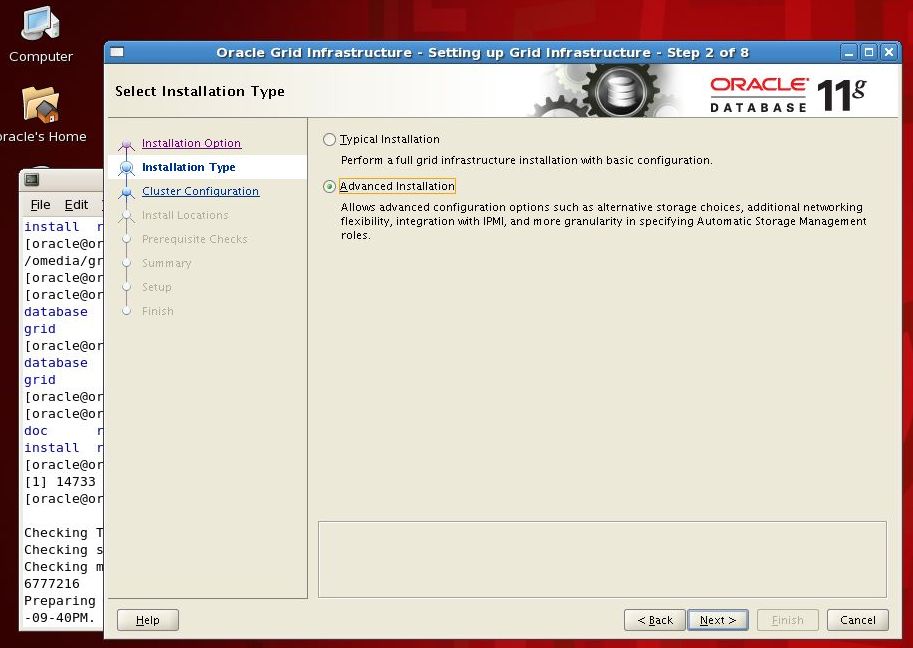
On the next screen we select Advanced Installation
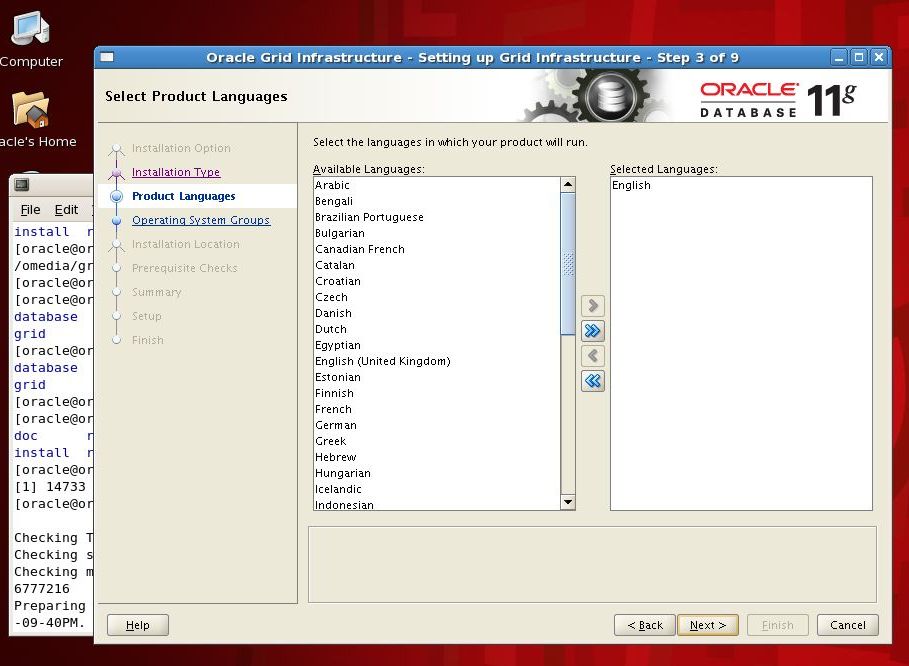
On the next screen we select the languages to install. I am happy with just English.

On the next screen we unselect Configure GNS and then define our cluster name and SCAN port number. I am going to call my cluster underworld with a SCAN name of underworld-scan. This matches the SCAN definition we added to our DNS server back in Part VII.
I am defining the port for the SCAN listener as 1561, and not the suggested 1521.

On the next screen we define our cluster nodes. Orpheus is added automatically but we need to add Eurydice manually by selecting Add and then defining the addresses eurydice and eurydice-vip. Again these should match the addresses we added to the DNS server back in Part VII.

On the next screen we define the ethernet networks to use for our cluster traffic. Remember eth0 is the public port we use to access the outside world, and since this is a laptop that address changes. We set eth0 to Do Not Use
The eth1 network is the public network we set up on VMnet2 so we set that to Public.
The eth2 network is the private network we set up on VMnet3 so we set that to Private.
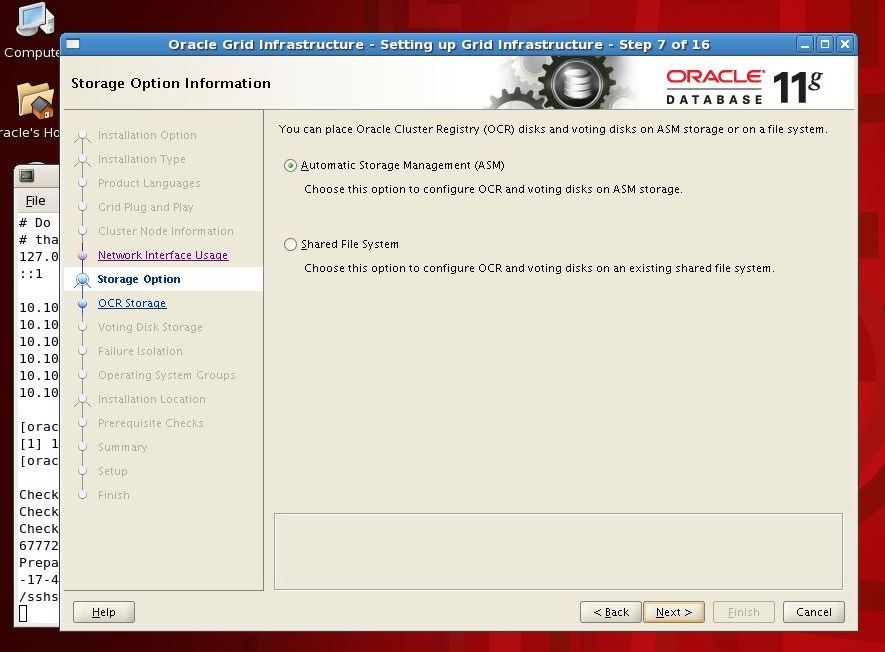
On the next screen we choose Automatic Storage Management (ASM)
On the next screen we should see the DATA ASM diskgroup listed. Set redundancy to External and check the ORCL:DATA option for the DATA disk group. Since this is a demonstration only we are going to place all of our files, including cluster and voting files, into a single disk group.
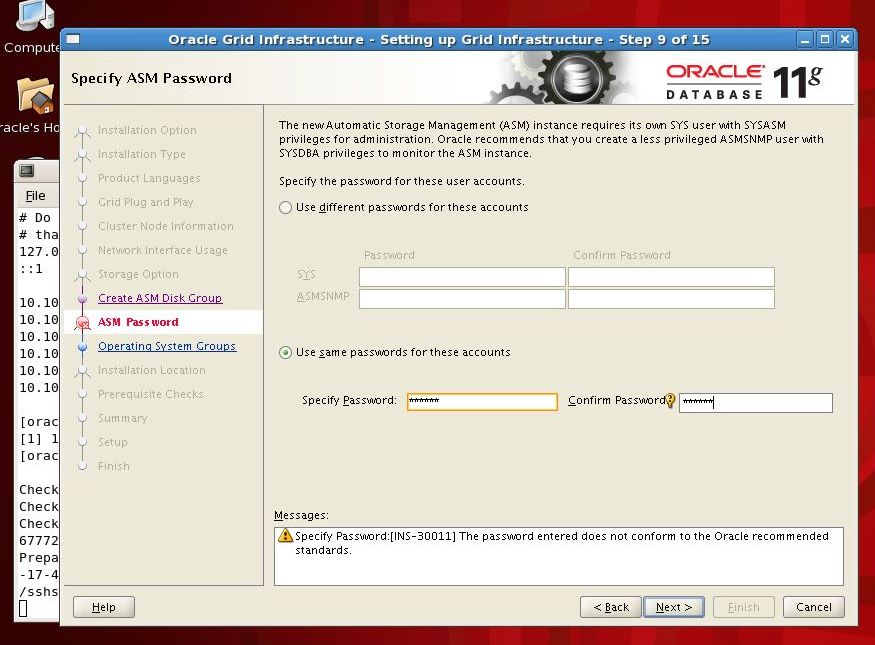
On the next screen check Use same passwords for these accounts. Since this is a demo I usually set these to something very simple like oracle. But make a note of this password as you will need it in Part X.
The installer warns us that our password choice is not very secure. That’s okay, I don’t forsee anyone really trying to hack into this RAC cluster.
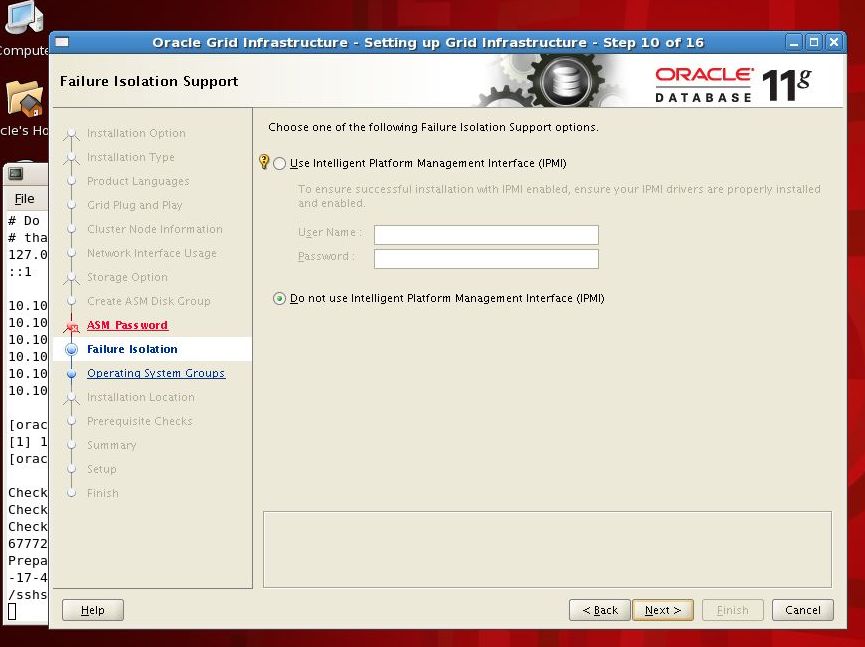
On the next screen select Do not use Intelligent Platform Management Interface (IPMI).

On the next screen we should see OS groups for ASM management listed. These should be set as follows:
| ASM Database Administrator (OSDBA) Group | asmdba |
| ASM Database Administrator Operator (OSOPER) Group | oinstall |
| ASM Instance Administrator (OSASM) Group | asmadmin |

On the next screen we choose where to install the Oracle Base and the Grid software. Note that the Grid software cannot be installed as a sub-directory of the Oracle Base.
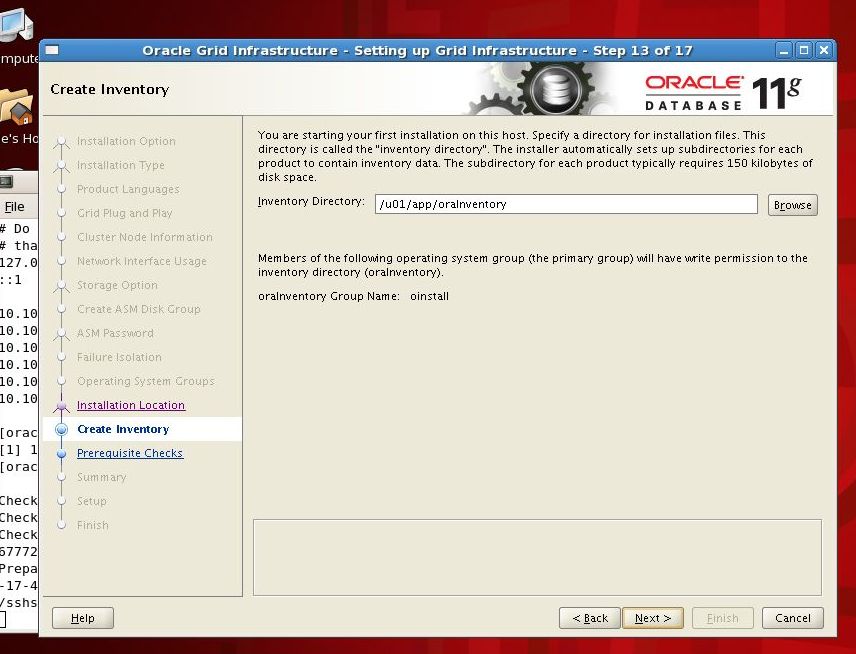
On the next screen we select a location for the Oracle Inventory.
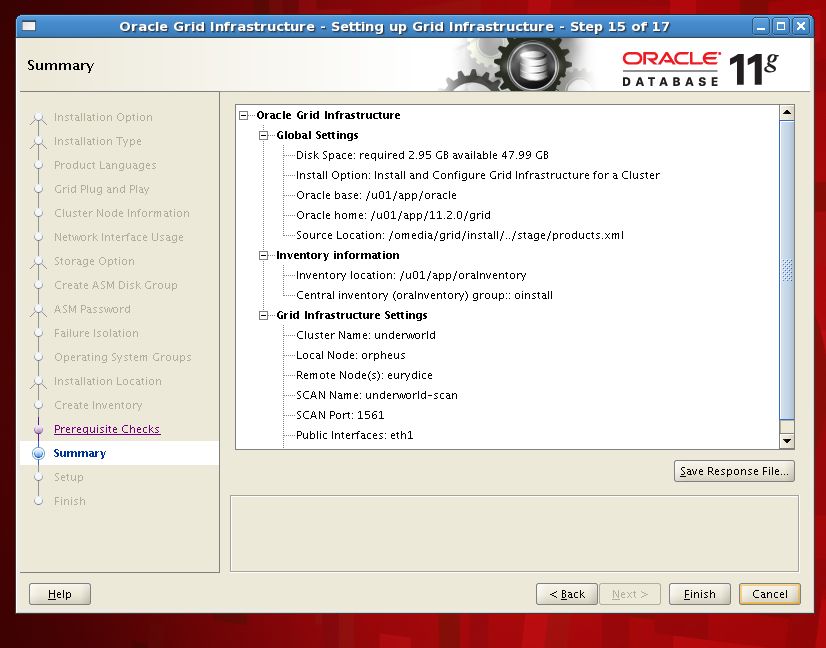
On the next screen we can verify that we have defined everything correctly. If everything looks good then press Finish
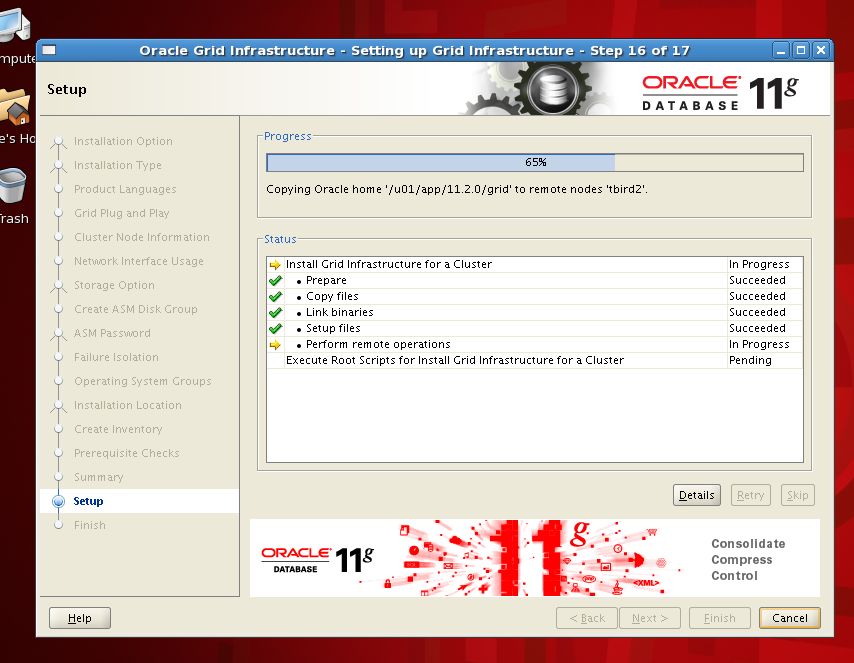
The install process can take a while to complete. On my VM RAC it will take at least ten minutes to complete. Don’t be alarmed if things hang at 65% for a while. This is normal. However you can check the second node to ensure that disk free space is gradually decreasing. If the 65% progress remains static for over 30 minutes you might have forgotten to disable the firewall.

Once the software install finishes we are presented with a dialog to run some scripts as the root user.
STOP! This is the part of the process where most people make mistakes!
It is extremely important that we run the scripts listed in the order listed, and that we wait for scripts to complete on Orpheus before we run them on Eurydice.
First we will run the orainstRoot.sh script on Orpheus:
[root@orpheus grid]# ./orainstRoot.sh
Changing permissions of /u01/app/oraInventory.
Adding read,write permissions for group.
Removing read,write,execute permissions for world.

Changing groupname of /u01/app/oraInventory to oinstall.
The execution of the script is complete.
Next we can run the same script on Eurydice.
Now we run the root.sh script on Orpheus. This will take a while to complete and MUST be allowed to run to completion before we start the execution on Eurydice.
Given the critical nature of this step, I have elected to show you the full output of the script on both my VM nodes. First Orpheus:
[root@orpheus grid]# ./root.sh
Running Oracle 11g root.sh script...

The following environment variables are set as:
    ORACLE_OWNER= oracle
    ORACLE_HOME=  /u01/app/11.2.0/grid

Enter the full pathname of the local bin directory: [/usr/local/bin]:
   Copying dbhome to /usr/local/bin ...
   Copying oraenv to /usr/local/bin ...
   Copying coraenv to /usr/local/bin ...


Creating /etc/oratab file...
Entries will be added to the /etc/oratab file as needed by
Database Configuration Assistant when a database is created
Finished running generic part of root.sh script.
Now product-specific root actions will be performed.
2012-10-29 20:50:56: Parsing the host name
2012-10-29 20:50:56: Checking for super user privileges
2012-10-29 20:50:56: User has super user privileges
Using configuration parameter file: /u01/app/11.2.0/grid/crs/install/crsconfig_params
Creating trace directory
LOCAL ADD MODE
Creating OCR keys for user 'root', privgrp 'root'..
Operation successful.
  root wallet
  root wallet cert
  root cert export
  peer wallet
  profile reader wallet
  pa wallet
  peer wallet keys
  pa wallet keys
  peer cert request
  pa cert request
  peer cert
  pa cert
  peer root cert TP
  profile reader root cert TP
  pa root cert TP
  peer pa cert TP
  pa peer cert TP
  profile reader pa cert TP
  profile reader peer cert TP
  peer user cert
  pa user cert
Adding daemon to inittab
CRS-4123: Oracle High Availability Services has been started.
ohasd is starting
CRS-2672: Attempting to start 'ora.gipcd' on 'orpheus'
CRS-2672: Attempting to start 'ora.mdnsd' on 'orpheus'
CRS-2676: Start of 'ora.mdnsd' on 'orpheus' succeeded
CRS-2676: Start of 'ora.gipcd' on 'orpheus' succeeded
CRS-2672: Attempting to start 'ora.gpnpd' on 'orpheus'
CRS-2676: Start of 'ora.gpnpd' on 'orpheus' succeeded
CRS-2672: Attempting to start 'ora.cssdmonitor' on 'orpheus'
CRS-2676: Start of 'ora.cssdmonitor' on 'orpheus' succeeded
CRS-2672: Attempting to start 'ora.cssd' on 'orpheus'
CRS-2672: Attempting to start 'ora.diskmon' on 'orpheus'
CRS-2676: Start of 'ora.diskmon' on 'orpheus' succeeded
CRS-2676: Start of 'ora.cssd' on 'orpheus' succeeded
CRS-2672: Attempting to start 'ora.ctssd' on 'orpheus'
CRS-2676: Start of 'ora.ctssd' on 'orpheus' succeeded

ASM created and started successfully.

DiskGroup DATA created successfully.

clscfg: -install mode specified
Successfully accumulated necessary OCR keys.
Creating OCR keys for user 'root', privgrp 'root'..
Operation successful.
CRS-2672: Attempting to start 'ora.crsd' on 'orpheus'
CRS-2676: Start of 'ora.crsd' on 'orpheus' succeeded
CRS-4256: Updating the profile
Successful addition of voting disk 2e7657066f434fb3bf49ddfec8560948.
Successfully replaced voting disk group with +DATA.
CRS-4256: Updating the profile
CRS-4266: Voting file(s) successfully replaced
##  STATE    File Universal Id                File Name Disk group
--  -----    -----------------                --------- ---------
 1. ONLINE   2e7657066f434fb3bf49ddfec8560948 (ORCL:DATA) [DATA]
Located 1 voting disk(s).
CRS-2673: Attempting to stop 'ora.crsd' on 'orpheus'
CRS-2677: Stop of 'ora.crsd' on 'orpheus' succeeded
CRS-2673: Attempting to stop 'ora.asm' on 'orpheus'
CRS-2677: Stop of 'ora.asm' on 'orpheus' succeeded
CRS-2673: Attempting to stop 'ora.ctssd' on 'orpheus'
CRS-2677: Stop of 'ora.ctssd' on 'orpheus' succeeded
CRS-2673: Attempting to stop 'ora.cssdmonitor' on 'orpheus'
CRS-2677: Stop of 'ora.cssdmonitor' on 'orpheus' succeeded
CRS-2673: Attempting to stop 'ora.cssd' on 'orpheus'
CRS-2677: Stop of 'ora.cssd' on 'orpheus' succeeded
CRS-2673: Attempting to stop 'ora.gpnpd' on 'orpheus'
CRS-2677: Stop of 'ora.gpnpd' on 'orpheus' succeeded
CRS-2673: Attempting to stop 'ora.gipcd' on 'orpheus'
CRS-2677: Stop of 'ora.gipcd' on 'orpheus' succeeded
CRS-2673: Attempting to stop 'ora.mdnsd' on 'orpheus'
CRS-2677: Stop of 'ora.mdnsd' on 'orpheus' succeeded
CRS-2672: Attempting to start 'ora.mdnsd' on 'orpheus'
CRS-2676: Start of 'ora.mdnsd' on 'orpheus' succeeded
CRS-2672: Attempting to start 'ora.gipcd' on 'orpheus'
CRS-2676: Start of 'ora.gipcd' on 'orpheus' succeeded
CRS-2672: Attempting to start 'ora.gpnpd' on 'orpheus'
CRS-2676: Start of 'ora.gpnpd' on 'orpheus' succeeded
CRS-2672: Attempting to start 'ora.cssdmonitor' on 'orpheus'
CRS-2676: Start of 'ora.cssdmonitor' on 'orpheus' succeeded
CRS-2672: Attempting to start 'ora.cssd' on 'orpheus'
CRS-2672: Attempting to start 'ora.diskmon' on 'orpheus'
CRS-2676: Start of 'ora.diskmon' on 'orpheus' succeeded
CRS-2676: Start of 'ora.cssd' on 'orpheus' succeeded
CRS-2672: Attempting to start 'ora.ctssd' on 'orpheus'
CRS-2676: Start of 'ora.ctssd' on 'orpheus' succeeded
CRS-2672: Attempting to start 'ora.asm' on 'orpheus'
CRS-2676: Start of 'ora.asm' on 'orpheus' succeeded
CRS-2672: Attempting to start 'ora.crsd' on 'orpheus'
CRS-2676: Start of 'ora.crsd' on 'orpheus' succeeded
CRS-2672: Attempting to start 'ora.evmd' on 'orpheus'
CRS-2676: Start of 'ora.evmd' on 'orpheus' succeeded
CRS-2672: Attempting to start 'ora.asm' on 'orpheus'
CRS-2676: Start of 'ora.asm' on 'orpheus' succeeded
CRS-2672: Attempting to start 'ora.DATA.dg' on 'orpheus'
CRS-2676: Start of 'ora.DATA.dg' on 'orpheus' succeeded
CRS-2672: Attempting to start 'ora.registry.acfs' on 'orpheus'
CRS-2676: Start of 'ora.registry.acfs' on 'orpheus' succeeded

orpheus     2012/10/29 20:56:44     /u01/app/11.2.0/grid/cdata/orpheus/backup_20121029_205644.olr
Preparing packages for installation...
cvuqdisk-1.0.7-1
Configure Oracle Grid Infrastructure for a Cluster ... succeeded
Updating inventory properties for clusterware
Starting Oracle Universal Installer...

Checking swap space: must be greater than 500 MB.   Actual 4008 MB    Passed
The inventory pointer is located at /etc/oraInst.loc
The inventory is located at /u01/app/oraInventory
'UpdateNodeList' was successful.
Now we can execute the root.sh script on Eurydice:
[root@eurydice grid]# ./root.sh
Running Oracle 11g root.sh script...

The following environment variables are set as:
    ORACLE_OWNER= oracle
    ORACLE_HOME=  /u01/app/11.2.0/grid

Enter the full pathname of the local bin directory: [/usr/local/bin]:
   Copying dbhome to /usr/local/bin ...
   Copying oraenv to /usr/local/bin ...
   Copying coraenv to /usr/local/bin ...


Creating /etc/oratab file...
Entries will be added to the /etc/oratab file as needed by
Database Configuration Assistant when a database is created
Finished running generic part of root.sh script.
Now product-specific root actions will be performed.
2012-10-29 20:57:56: Parsing the host name
2012-10-29 20:57:56: Checking for super user privileges
2012-10-29 20:57:56: User has super user privileges
Using configuration parameter file: /u01/app/11.2.0/grid/crs/install/crsconfig_params
Creating trace directory
LOCAL ADD MODE
Creating OCR keys for user 'root', privgrp 'root'..
Operation successful.
Adding daemon to inittab
CRS-4123: Oracle High Availability Services has been started.
ohasd is starting
CRS-4402: The CSS daemon was started in exclusive mode but found an active CSS daemon on node orpheus, number 1, and is terminating
CRS-2673: Attempting to stop 'ora.cssdmonitor' on 'eurydice'
CRS-2677: Stop of 'ora.cssdmonitor' on 'eurydice' succeeded
CRS-2673: Attempting to stop 'ora.gpnpd' on 'eurydice'
CRS-2677: Stop of 'ora.gpnpd' on 'eurydice' succeeded
CRS-2673: Attempting to stop 'ora.gipcd' on 'eurydice'
CRS-2677: Stop of 'ora.gipcd' on 'eurydice' succeeded
CRS-2673: Attempting to stop 'ora.mdnsd' on 'eurydice'
CRS-2677: Stop of 'ora.mdnsd' on 'eurydice' succeeded
An active cluster was found during exclusive startup, restarting to join the cluster
CRS-2672: Attempting to start 'ora.mdnsd' on 'eurydice'
CRS-2676: Start of 'ora.mdnsd' on 'eurydice' succeeded
CRS-2672: Attempting to start 'ora.gipcd' on 'eurydice'
CRS-2676: Start of 'ora.gipcd' on 'eurydice' succeeded
CRS-2672: Attempting to start 'ora.gpnpd' on 'eurydice'
CRS-2676: Start of 'ora.gpnpd' on 'eurydice' succeeded
CRS-2672: Attempting to start 'ora.cssdmonitor' on 'eurydice'
CRS-2676: Start of 'ora.cssdmonitor' on 'eurydice' succeeded
CRS-2672: Attempting to start 'ora.cssd' on 'eurydice'
CRS-2672: Attempting to start 'ora.diskmon' on 'eurydice'
CRS-2676: Start of 'ora.diskmon' on 'eurydice' succeeded
CRS-2676: Start of 'ora.cssd' on 'eurydice' succeeded
CRS-2672: Attempting to start 'ora.ctssd' on 'eurydice'
CRS-2676: Start of 'ora.ctssd' on 'eurydice' succeeded
CRS-2672: Attempting to start 'ora.drivers.acfs' on 'eurydice'
CRS-2676: Start of 'ora.drivers.acfs' on 'eurydice' succeeded
CRS-2672: Attempting to start 'ora.asm' on 'eurydice'
CRS-2676: Start of 'ora.asm' on 'eurydice' succeeded
CRS-2672: Attempting to start 'ora.crsd' on 'eurydice'
CRS-2676: Start of 'ora.crsd' on 'eurydice' succeeded
CRS-2672: Attempting to start 'ora.evmd' on 'eurydice'
CRS-2676: Start of 'ora.evmd' on 'eurydice' succeeded

eurydice     2012/10/29 21:01:14     /u01/app/11.2.0/grid/cdata/eurydice/backup_20121029_210114.olr
Preparing packages for installation...
cvuqdisk-1.0.7-1
Configure Oracle Grid Infrastructure for a Cluster ... succeeded
Updating inventory properties for clusterware
Starting Oracle Universal Installer...

Checking swap space: must be greater than 500 MB.   Actual 4008 MB    Passed
The inventory pointer is located at /etc/oraInst.loc
The inventory is located at /u01/app/oraInventory
'UpdateNodeList' was successful.
The critical part of the Eurydice install process is the line:
An active cluster was found during exclusive startup, restarting to join the cluster
If everything looks okay, click the OK button:
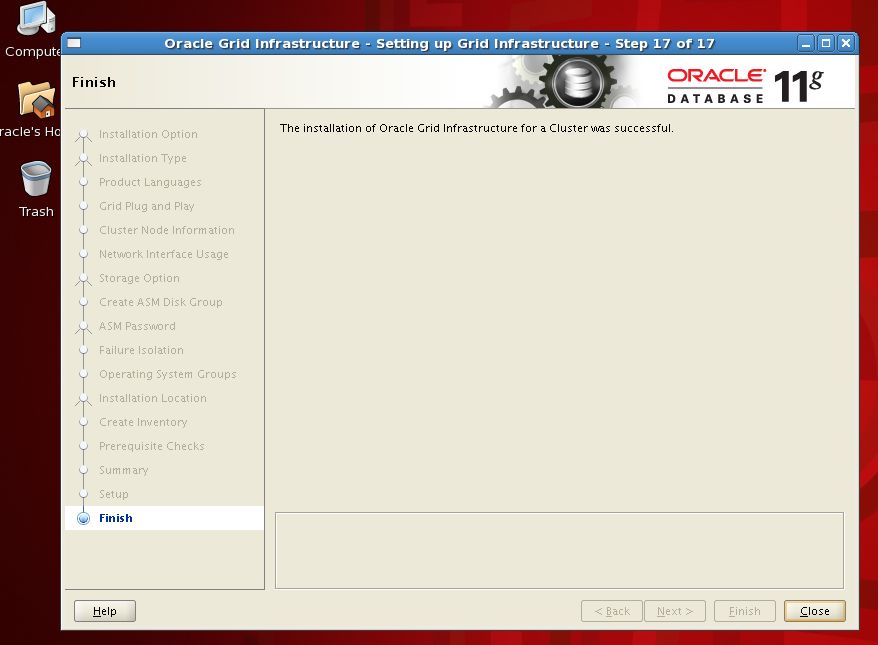
The Grid install is now complete.
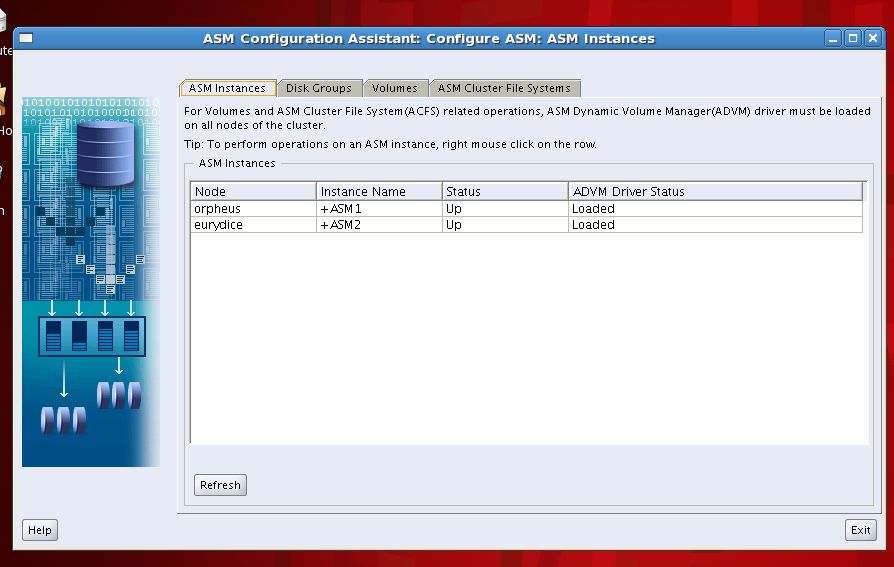
If you want to check that both nodes are connected, launch the asmca tool and check that ASM instances are shown on both Orpheus and Eurydice.
| Article Quick Navigation | ||
|---|---|---|
| Previous Step | Main Index | Next Step |
 the gruffdba
Hi Gruff!
Sorry to bother.
I have followed your steps to build the same environment with the same softwares the only difference is I used VMware Workstation 9, and all is well from Part I to Part VIII, but at this Part IX, I met two errors.
1. I use nslookup to verify 2 VIP’s resolve, it’s correct but still issued INS-40910 error while Grid Installer “Cluster node information”.
Finally I add 2 VIPs to /etc/hosts and then it passed. Is this situation normal ?
2. I executed “./sshUserSetup.sh -user oracle -hosts “orpheus eurydice” -verbose” only on orpheus, when it done I can SSH eurydice from orpheus withou password, but it asked me password when I SSH orpheus from eurydice. Does this sshUserSetup.sh need to be executed from eurydice ?
Sorry for my poor English, much appreciation to you. Thanks in advance.
Hi Jason,
For issue 1, check that your /etc/hosts file has both the short-version and the fully-qualified version, since the Cluster installer will try to check the fully qualified VIP name, in my example it was orpheus-vip.hadesnet and eurydice-vip.hadesnet.
For issue 2, check the output file /tmp/sshUserSetup_date to see if there were any errors recorded. As far as I can recall the sshUserSetup script sets up ssh connectivity in both directions, so its possible something went wrong.
Graham aka The Gruff DBA.
Hi Gruff,
I have encountered the following error while setting up the SCAN name.
In Orpheus machine
[root@orpheus ~]# nslookup underworld-scan
Server: 10.10.1.10
Address: 10.10.1.10#53
Name: underworld-scan.hadesnet
Address: 10.10.1.22
Name: underworld-scan.hadesnet
Address: 10.10.1.12
[root@orpheus ~]#
In Eurydice machine
[root@eurydice ~]# nslookup underworld-scan
Server: 10.10.1.10
Address: 10.10.1.10#53
Name: underworld-scan.hadesnet
Address: 10.10.1.12
Name: underworld-scan.hadesnet
Address: 10.10.1.22
[root@eurydice ~]#
ORA-40719 means the installer thinks one or more of the SCAN addresses is already in use.
Try pinging both SCAN address from the Linux prompt before launching the installer.
Both SCAN addresses should fail the ping.
If either address is responding with data then the address is already in use. On a VMNet the only things running should be in your VM environment, so check your /etc/hosts file to make sure other addresses have been configured correctly.
Hope that helps.
Gruff.
Thanks for the response Gruff..
In Part VII : I have added the VIPs and SCAN IPaddresses to the ethernet eth1. Please find the images below.
http://imgur.com/uyg5u
Is this the correct procedure to proceed or not?
Much appreciation Gruff!!!
Hi Bharath,
Looks like you have configured three separate IP address all for eth1 – eth1, eth1:1 and eth1:2
You should only have one IP address, and in the example I used 10.10.1.10.
Delete the 1:1 and 1:2 entries from your config, double check the eth1 settings and restart.
HTH.
Gruff.
Hi Gruff,
Please have a glance whether the files are correctly configured or not
Both SCAN addresses are pinging..
[oracle@orpheus grid]$
[oracle@orpheus grid]$ ping 10.10.1.12
PING 10.10.1.12 (10.10.1.12) 56(84) bytes of data.
64 bytes from 10.10.1.12: icmp_seq=1 ttl=64 time=0.033 ms
64 bytes from 10.10.1.12: icmp_seq=2 ttl=64 time=0.036 ms
64 bytes from 10.10.1.12: icmp_seq=3 ttl=64 time=0.039 ms
64 bytes from 10.10.1.12: icmp_seq=4 ttl=64 time=0.046 ms
— 10.10.1.12 ping statistics —
4 packets transmitted, 4 received, 0% packet loss, time 3001ms
rtt min/avg/max/mdev = 0.033/0.038/0.046/0.007 ms
[oracle@orpheus grid]$ ping 10.10.1.22
PING 10.10.1.22 (10.10.1.22) 56(84) bytes of data.
64 bytes from 10.10.1.22: icmp_seq=1 ttl=64 time=0.269 ms
64 bytes from 10.10.1.22: icmp_seq=2 ttl=64 time=0.306 ms
64 bytes from 10.10.1.22: icmp_seq=3 ttl=64 time=0.357 ms
64 bytes from 10.10.1.22: icmp_seq=4 ttl=64 time=0.334 ms
^X64 bytes from 10.10.1.22: icmp_seq=5 ttl=64 time=0.295 ms
— 10.10.1.22 ping statistics —
5 packets transmitted, 5 received, 0% packet loss, time 4002ms
rtt min/avg/max/mdev = 0.269/0.312/0.357/0.032 ms
[oracle@orpheus grid]$
[oracle@orpheus grid]$
In Orpheus
[oracle@orpheus grid]$
[oracle@orpheus grid]$ cat /etc/hosts
# Do not remove the following line, or various programs
# that require network functionality will fail.
127.0.0.1 localhost.localdomain localhost
::1 localhost6.localdomain6 localhost6
10.10.1.10 orpheus orpheus.hadesnet
10.10.1.20 eurydice eurydice.hadesnet
10.10.2.10 orpheus-priv orpheus-priv.hadesnet
10.10.2.20 eurydice-priv eurydice-priv.hadesnet
[oracle@orpheus grid]$
[root@orpheus ~]#
[root@orpheus ~]# cat /var/named/hadesnet.zone
$TTL 86400
@ IN SOA hadesnet. hadesnet.(
42 ; serial (d. adams)
3H ; refresh
15M ; retry
1W ; expiry
1D ) ; minimum
hadesnet. IN NS 10.10.1.20
localhost IN A 127.0.0.1
orpheus.hadesnet. IN A 10.10.1.10
eurydice.hadesnet. IN A 10.10.1.20
orpheus-vip.hadesnet. IN A 10.10.1.11
eurydice-vip.hadesnet. IN A 10.10.1.21
underworld-scan.hadesnet. IN A 10.10.1.12
underworld-scan.hadesnet. IN A 10.10.1.22
[root@orpheus ~]#
[root@orpheus ~]#
In Eurydice
[oracle@eurydice ~]$
[oracle@eurydice ~]$ cat /etc/hosts
# Do not remove the following line, or various programs
# that require network functionality will fail.
127.0.0.1 localhost.localdomain localhost
::1 localhost6.localdomain6 localhost6
10.10.1.10 orpheus orpheus.hadesnet
10.10.1.20 eurydice eurydice.hadesnet
10.10.2.10 orpheus-priv orpheus-priv.hadesnet
10.10.2.20 eurydice-priv eurydice-priv.hadesnet
[oracle@eurydice ~]$
[oracle@eurydice ~]$
[root@eurydice ~]#
[root@eurydice ~]# cat /var/named/hadesnet.zone
$TTL 86400
@ IN SOA hadesnet. hadesnet.(
42 ; serial (d. adams)
3H ; refresh
15M ; retry
1W ; expiry
1D ) ; minimum
hadesnet. IN NS 10.10.1.20
localhost IN A 127.0.0.1
orpheus.hadesnet. IN A 10.10.1.10
eurydice.hadesnet. IN A 10.10.1.20
orpheus-vip.hadesnet. IN A 10.10.1.11
eurydice-vip.hadesnet. IN A 10.10.1.21
underworld-scan.hadesnet. IN A 10.10.1.12
underworld-scan.hadesnet. IN A 10.10.1.22
[root@eurydice ~]#
[root@eurydice ~]#
Thanks in advance.
Hi bharath,
Your settings look right. Do you have CRS running or not? If the installer is still failing saying that the SCAN address is in use, then use traceroute to determine where it is coming from.
You might need to consider using a different subnet for your VMNet2.
Hope that helps.
Gruff.
Hi Gruff,
Me also using vmware workstation 9 which is facing the same 2nd issue as mentioned jason above, looked into log file and done some changes as specified in the log file, but no luck…..still not resolved..
Orpheus can easily established a connection to Eurydice.
[oracle@orpheus sshsetup]$
[oracle@orpheus sshsetup]$ ssh eurydice
Last login: Fri Dec 21 06:16:12 2012 from orpheus
[oracle@eurydice ~]$
In Eurydice its asking the password of orpheus password.
[oracle@eurydice ~]$
[oracle@eurydice ~]$
[oracle@eurydice ~]$ ssh orpheus
oracle@orpheus’s password:
Last login: Fri Dec 21 06:16:36 2012 from eurydice
[oracle@orpheus ~]$
Please find the contents of the logfile of sshUserSetup.
The output of this script is also logged into /tmp/sshUserSetup_2012-12-21-06-14-33.log
Hosts are orpheus eurydice
user is oracle
Platform:- Linux
Checking if the remote hosts are reachable
Remote host reachability check succeeded.
The following hosts are reachable: orpheus eurydice.
The following hosts are not reachable: .
All hosts are reachable. Proceeding further…
The script will setup SSH connectivity from the host orpheus.hadesnet to all
the remote hosts. After the script is executed, the user can use SSH to run
commands on the remote hosts or copy files between this host orpheus.hadesnet
and the remote hosts without being prompted for passwords or confirmations.
NOTE 1:
As part of the setup procedure, this script will use ssh and scp to copy
files between the local host and the remote hosts. Since the script does not
store passwords, you may be prompted for the passwords during the execution of
the script whenever ssh or scp is invoked.
NOTE 2:
AS PER SSH REQUIREMENTS, THIS SCRIPT WILL SECURE THE USER HOME DIRECTORY
AND THE .ssh DIRECTORY BY REVOKING GROUP AND WORLD WRITE PRIVILEDGES TO THESE
directories.
Do you want to continue and let the script make the above mentioned changes (yes/no)?
The user chose
Please specify if you want to specify a passphrase for the private key this script will create for the local host. Passphrase is used to encrypt the private key and makes SSH much more secure. Type ‘yes’ or ‘no’ and then press enter. In case you press ‘yes’, you would need to enter the passphrase whenever the script executes ssh or scp.
The estimated number of times the user would be prompted for a passphrase is 4. In addition, if the private-public files are also newly created, the user would have to specify the passphrase on one additional occasion.
Enter ‘yes’ or ‘no’.
The user chose
The user chose
Creating .ssh directory on local host, if not present already
Creating authorized_keys file on local host
Changing permissions on authorized_keys to 644 on local host
Creating known_hosts file on local host
Changing permissions on known_hosts to 644 on local host
Creating config file on local host
Creating .ssh directory and setting permissions on remote host orpheus
THE SCRIPT WOULD ALSO BE REVOKING WRITE PERMISSIONS FOR group AND others ON THE HOME DIRECTORY FOR oracle. THIS IS AN SSH REQUIREMENT.
The script would create ~oracle/.ssh/config file on remote host orpheus. If a config file exists already at ~oracle/.ssh/config, it would be backed up to ~oracle/.ssh/config.backup.
The user may be prompted for a password here since the script would be running SSH on host orpheus.
Done with creating .ssh directory and setting permissions on remote host orpheus.
Creating .ssh directory and setting permissions on remote host eurydice
THE SCRIPT WOULD ALSO BE REVOKING WRITE PERMISSIONS FOR group AND others ON THE HOME DIRECTORY FOR oracle. THIS IS AN SSH REQUIREMENT.
The script would create ~oracle/.ssh/config file on remote host eurydice. If a config file exists already at ~oracle/.ssh/config, it would be backed up to ~oracle/.ssh/config.backup.
The user may be prompted for a password here since the script would be running SSH on host eurydice.
Done with creating .ssh directory and setting permissions on remote host eurydice.
Copying local host public key to the remote host orpheus
The user may be prompted for a password or passphrase here since the script would be using SCP for host orpheus.
Done copying local host public key to the remote host orpheus
Copying local host public key to the remote host eurydice
The user may be prompted for a password or passphrase here since the script would be using SCP for host eurydice.
Done copying local host public key to the remote host eurydice
SSH setup is complete.
————————————————————————
Verifying SSH setup
===================
The script will now run the date command on the remote nodes using ssh
to verify if ssh is setup correctly. IF THE SETUP IS CORRECTLY SETUP,
THERE SHOULD BE NO OUTPUT OTHER THAN THE DATE AND SSH SHOULD NOT ASK FOR
PASSWORDS. If you see any output other than date or are prompted for the
password, ssh is not setup correctly and you will need to resolve the
issue and set up ssh again.
The possible causes for failure could be:
1. The server settings in /etc/ssh/sshd_config file do not allow ssh
for user oracle.
4. ~oracle or ~oracle/.ssh on the remote host may not be owned by oracle.
5. User may not have passed -shared option for shared remote users or
may be passing the -shared option for non-shared remote users.
6. If there is output in addition to the date, but no password is asked,
it may be a security alert shown as part of company policy. Append the
additional text to the /sysman/prov/resources/ignoreMessages.txt file.
————————————————————————
–orpheus:–
Running /usr/bin/ssh -x -l oracle orpheus date to verify SSH connectivity has been setup from local host to orpheus.
IF YOU SEE ANY OTHER OUTPUT BESIDES THE OUTPUT OF THE DATE COMMAND OR IF YOU ARE PROMPTED FOR A PASSWORD HERE, IT MEANS SSH SETUP HAS NOT BEEN SUCCESSFUL. Please note that being prompted for a passphrase may be OK but being prompted for a password is ERROR.
Fri Dec 21 06:14:57 PST 2012
————————————————————————
–eurydice:–
Running /usr/bin/ssh -x -l oracle eurydice date to verify SSH connectivity has been setup from local host to eurydice.
IF YOU SEE ANY OTHER OUTPUT BESIDES THE OUTPUT OF THE DATE COMMAND OR IF YOU ARE PROMPTED FOR A PASSWORD HERE, IT MEANS SSH SETUP HAS NOT BEEN SUCCESSFUL. Please note that being prompted for a passphrase may be OK but being prompted for a password is ERROR.
Fri Dec 21 06:14:57 PST 2012
————————————————————————
SSH verification complete.
Please let me know if you need more details.
Thanks,
BHarath
Hi BHarath,
The sshUserSetup.sh seems to cause a lot of problems as I have seen more comments on this than anything else.
The sshUserSetup.sh script from Oracle by default only establishes unchallenged connection from the source host to the targets. I have checked this on my cluster and as written, you will only get unchallenged connections from Orpheus to Eurydice, and not vice-versa.
To establish unchallenged connections in both directions you need to add the “-advanced” flag to the command.
I have updated the separate post on sshUserSetup.sh to show this option, as well as some other flags that help make the process smoother.
You can run sshUserSetup.sh script again any time. You will find it in the Oracle Home under the deinstall directory.
Hope that helps.
Gruff.
Hi gruff,
Thanks for response gruff.
I’am getting this error [INS-40910] Virtual IP: orpheus-vip entered is invalid, while configuring the Virtual IP’s for
Orpheus & Eurydice.
From the eurydice machine side it looks fine, but the grid installation is not accepting the Orpheus VIP.
I have checked all the things but not able to find the exact problem.
FYI…
[root@orpheus ~]#
[root@orpheus ~]# cat /var/named/hadesnet.zone
$TTL 86400
@ IN SOA hadesnet. hadesnet.(
42 ; serial (d. adams)
3H ; refresh
15M ; retry
1W ; expiry
1D ) ; minimum
hadesnet. IN NS 10.10.1.20
localhost IN A 127.0.0.1
orpheus.hadesnet. IN A 10.10.1.10
eurydice.hadesnet. IN A 10.10.1.20
orpheus-vip.hadesnet. IN A 10.10.1.11
eurydice-vip.hadesnet. IN A 10.10.1.21
underworld-scan.hadesnet. IN A 10.10.1.12
underworld-scan.hadesnet. IN A 10.10.1.22
[root@orpheus ~]#
[root@orpheus ~]# cat /etc/resolv.conf
nameserver 10.10.1.10 # orpheus DNS server
nameserver 10.10.1.20 # eurydice DNS server
nameserver 192.168.1.1 # Primary DNS in the domain
search hadesnet # Local Domain
[root@orpheus ~]#
[root@orpheus ~]#
[root@orpheus ~]# nslookup orpheus-vip
Server: 10.10.1.10
Address: 10.10.1.10#53
Name: orpheus-vip.hadesnet
Address: 10.10.1.11
[root@orpheus ~]#
[root@orpheus ~]# nslookup eurydice-vip
Server: 10.10.1.10
Address: 10.10.1.10#53
Name: eurydice-vip.hadesnet
Address: 10.10.1.21
[root@orpheus ~]#
[root@orpheus ~]#
[root@orpheus ~]# cat /etc/hosts
# Do not remove the following line, or various programs
# that require network functionality will fail.
127.0.0.1 localhost.localdomain localhost
::1 localhost6.localdomain6 localhost6
10.10.1.10 orpheus orpheus.hadesnet
10.10.1.20 eurydice eurydice.hadesnet
10.10.2.10 orpheus-priv orpheus-priv.hadesnet
10.10.2.20 eurydice-priv eurydice-priv.hadesnet
[root@orpheus ~]#
[root@orpheus ~]# service named status
number of zones: 1
debug level: 0
xfers running: 0
xfers deferred: 0
soa queries in progress: 0
query logging is OFF
recursive clients: 0/1000
tcp clients: 0/100
server is up and running
named (pid 5378) is running…
[root@orpheus ~]#
[root@orpheus ~]#
[root@orpheus ~]# cat /etc/sysconfig/network-scripts/ifcfg-eth0
# Intel Corporation 82545EM Gigabit Ethernet Controller (Copper)
DEVICE=eth0
BOOTPROTO=none
ONBOOT=yes
HWADDR=00:0c:29:38:eb:09
TYPE=Ethernet
PEERDNS=no
[root@orpheus ~]# cat /etc/sysconfig/network-scripts/ifcfg-eth1
# Intel Corporation 82545EM Gigabit Ethernet Controller (Copper)
DEVICE=eth1
BOOTPROTO=none
ONBOOT=yes
HWADDR=00:0c:29:38:eb:13
NETMASK=255.255.255.0
IPADDR=10.10.1.10
TYPE=Ethernet
USERCTL=no
IPV6INIT=no
PEERDNS=no
[root@orpheus ~]# cat /etc/sysconfig/network-scripts/ifcfg-eth2
# Intel Corporation 82545EM Gigabit Ethernet Controller (Copper)
DEVICE=eth2
BOOTPROTO=none
ONBOOT=yes
HWADDR=00:0c:29:38:eb:1d
NETMASK=255.255.255.0
IPADDR=10.10.2.10
TYPE=Ethernet
USERCTL=no
IPV6INIT=no
PEERDNS=no
[root@orpheus ~]#
Thanks in advance.
Hi Bharath,
Try adding the VIPs to the /etc/hosts file. Here is mine, which is the same on Orpheus and Eurydice:
[oracle@orpheus ~]$ cat /etc/hosts
# Do not remove the following line, or various programs
# that require network functionality will fail.
127.0.0.1 localhost.localdomain localhost
::1 localhost6.localdomain6 localhost6
10.10.1.10 orpheus orpheus.hadesnet
10.10.1.20 eurydice eurydice.hadesnet
10.10.2.10 orpheus-priv orpheus-priv.hadesnet
10.10.2.20 eurydice-priv eurydice-priv.hadesnet
10.10.1.11 orpheus-vip orpheus-vip.hadesnet
10.10.1.21 eurydice-vip eurydice-vip.hadesnet
HTH
Gruff.
Hi,
I run root.sh on first node, and trace is same as yours, except of this part:
ADVM/ACFS is not supported on centos-release-6-3.el6.centos.9.x86_64
Is this ok, or I should do some more hacking
thanks in advance
What version of Oracle are you using?
For Centos6.3 you need 11.2.0.3.
Hi,
I’m using 11.2.0.1. The reason for that is that I don’t have oracle my support identifier.
Using this link it’s possible to run root.sh script on both nodes:
https://forums.oracle.com/forums/thread.jspa?messageID=10539549
I have another question: How to check that GRID is running on Centos 6.3?
thanks in advance
Right, you will need to modify the s_crsconfig_lib.pm script before you can install 11.2.0.1 on CentOS 6.
You will also need the following extra RPMs:
libcap-2.16-5.5.el6.i686.rpm
libattr-2.4.44-7.el6.i686.rpm
compat-libcap1-1.10-1.*.rpm
Otherwise you get the following error on Grid install:
/u01/app/oracle/product/11.2.0/db_1/bin/clscfg.bin: error while loading shared libraries: libcap.so.1: cannot open shared object file: No such file or directory
Failed to create keys in the OLR, rc = 32512, 32512
OLR configuration failed
HTH
Gruff.
I have another failure while running root.sh on the second node after success first node. I attach full failure script from second node while running root.sh… please comment to me.. (T_T)
[root@youniqlo02 grid]# ./root.sh
Running Oracle 11g root.sh script…
The following environment variables are set as:
ORACLE_OWNER= oracle
ORACLE_HOME= /app/grid
Enter the full pathname of the local bin directory: [/usr/local/bin]:
Copying dbhome to /usr/local/bin …
Copying oraenv to /usr/local/bin …
Copying coraenv to /usr/local/bin …
Creating /etc/oratab file…
Entries will be added to the /etc/oratab file as needed by
Database Configuration Assistant when a database is created
Finished running generic part of root.sh script.
Now product-specific root actions will be performed.
2013-02-18 19:12:33: Parsing the host name
2013-02-18 19:12:33: Checking for super user privileges
2013-02-18 19:12:33: User has super user privileges
Using configuration parameter file: /app/grid/crs/install/crsconfig_params
Creating trace directory
LOCAL ADD MODE
Creating OCR keys for user ‘root’, privgrp ‘root’..
Operation successful.
Adding daemon to inittab
CRS-4123: Oracle High Availability Services has been started.
ohasd is starting
CRS-2672: Attempting to start ‘ora.gipcd’ on ‘youniqlo02’
CRS-2672: Attempting to start ‘ora.mdnsd’ on ‘youniqlo02’
CRS-2676: Start of ‘ora.mdnsd’ on ‘youniqlo02’ succeeded
CRS-2676: Start of ‘ora.gipcd’ on ‘youniqlo02’ succeeded
CRS-2672: Attempting to start ‘ora.gpnpd’ on ‘youniqlo02’
CRS-2676: Start of ‘ora.gpnpd’ on ‘youniqlo02’ succeeded
CRS-2672: Attempting to start ‘ora.cssdmonitor’ on ‘youniqlo02’
CRS-2676: Start of ‘ora.cssdmonitor’ on ‘youniqlo02’ succeeded
CRS-2672: Attempting to start ‘ora.cssd’ on ‘youniqlo02’
CRS-2672: Attempting to start ‘ora.diskmon’ on ‘youniqlo02’
CRS-2676: Start of ‘ora.diskmon’ on ‘youniqlo02’ succeeded
CRS-2676: Start of ‘ora.cssd’ on ‘youniqlo02’ succeeded
CRS-2672: Attempting to start ‘ora.ctssd’ on ‘youniqlo02’
CRS-2676: Start of ‘ora.ctssd’ on ‘youniqlo02’ succeeded
DiskGroup DATA creation failed with the following message:
ORA-15018: diskgroup cannot be created
ORA-15031: disk specification ‘ORCL:DATA’ matches no disks
Configuration of ASM failed, see logs for details
Did not succssfully configure and start ASM
CRS-2500: Cannot stop resource ‘ora.crsd’ as it is not running
CRS-4000: Command Stop failed, or completed with errors.
Command return code of 1 (256) from command: /app/grid/bin/crsctl stop resource ora.crsd -init
Stop of resource “ora.crsd -init” failed
Failed to stop CRSD
CRS-2673: Attempting to stop ‘ora.asm’ on ‘youniqlo02’
CRS-2677: Stop of ‘ora.asm’ on ‘youniqlo02’ succeeded
CRS-2673: Attempting to stop ‘ora.ctssd’ on ‘youniqlo02’
CRS-2677: Stop of ‘ora.ctssd’ on ‘youniqlo02’ succeeded
CRS-2673: Attempting to stop ‘ora.cssdmonitor’ on ‘youniqlo02’
CRS-2677: Stop of ‘ora.cssdmonitor’ on ‘youniqlo02’ succeeded
CRS-2673: Attempting to stop ‘ora.cssd’ on ‘youniqlo02’
CRS-2677: Stop of ‘ora.cssd’ on ‘youniqlo02’ succeeded
CRS-2673: Attempting to stop ‘ora.gpnpd’ on ‘youniqlo02’
CRS-2677: Stop of ‘ora.gpnpd’ on ‘youniqlo02’ succeeded
CRS-2673: Attempting to stop ‘ora.gipcd’ on ‘youniqlo02’
CRS-2677: Stop of ‘ora.gipcd’ on ‘youniqlo02’ succeeded
CRS-2673: Attempting to stop ‘ora.mdnsd’ on ‘youniqlo02’
CRS-2677: Stop of ‘ora.mdnsd’ on ‘youniqlo02’ succeeded
Initial cluster configuration failed. See /app/grid/cfgtoollogs/crsconfig/rootcrs_youniqlo02.log for details
After searching web… I found similar symptoms like me.But not resolved.
http://apunhiran.blogspot.kr/2010/09/oracle-11gr2-grid-rootsh-fails-on-node2.html
In my case, All of /etc/sysconfig/oracleasm links? are valid as suggested on the page….
-Should node2 also can find “DATA”?
There’s no disks when scandisks…
Disks should be visible from both nodes, so check the Linux device table and ensure that both nodes see all devices.
You will need to use FDISK on the second node to update the partition table – just launch FDISK against the device and hit W to write the table.
Then you should be able to use asmlib’s scandisks option to see the disks you stamped on node 1.
Hi Gruff!
really appreciate the patience and effor you have put to write up all these stuffs and sharing this…
Your Blog helped me to configure my first RAC setup on my test machine..
hello gruff,
I am trying to install the grid software. but The GUI does not show up the ASM disk groups. can you please suggest?
Hi Bhanu,
Check my post “Using KFOD to verify disks before installing Grid Infrastructure” and use KFOD to ensure you have the disks properly presented before launching the GUI for the Grid install
Hi Gruff
I’m trying to install it on RHEL 6.3, I use your REHL 5 tutorial but with the udev rules, but when I’m installing the Oracle Grid at the final steps and run the root.sh script, the following error appears
CRS-4124: Oracle High Availability Services startup failed.
CRS-4000: Command Start failed, or completed with errors.
I was searching and found out that the version of grid for RHEL 6.3 should be 11.2.0.1.2 or above but I can’t find it, is there a way to update to that version or any way to avoid and solve this problema??
sorry for my english, is not my native language
thanks in advance
Pingback: Configure DNS on VMWare for 11GR2 RAC Installation | ORACLE DBA REAL TIME TRAINING
Hello,
Thank you for the great and very helpful tutorial for installing ORACLE RAC trought VMs.
I am writing this because while executing the root.sh on the second node it failed with the error”Timed out waiting for the CRS stack to start”, I checked Metalink and found somethings about network problems .
Do you have any idea what can cause this issue ?
Regards
Ismail
Sounds like some sort of mismatch between nodes.
I would check that the public and private NICs are configured correctly, and that you can ping all addresses. Did the runcluvfy.sh complete normally?
Also check Oracle Support Note 745215.1
hi,
i got struck here. plz anyone help me..
[oracle@nishant sshsetup]$ ./sshUserSetup.sh \
> -user oracle -hosts “RAC1 RAC2” \
> -noPromptPassphrase -confirm -advanced
The output of this script is also logged into /tmp/sshUserSetup_2014-09-24-04-46-09.log
Hosts are RAC1 RAC2
user is oracle
Platform:- Linux
Checking if the remote hosts are reachable
PING RAC1 (10.10.1.10) 56(84) bytes of data.
64 bytes from RAC1 (10.10.1.10): icmp_seq=1 ttl=64 time=0.011 ms
64 bytes from RAC1 (10.10.1.10): icmp_seq=2 ttl=64 time=0.034 ms
64 bytes from RAC1 (10.10.1.10): icmp_seq=3 ttl=64 time=0.063 ms
64 bytes from RAC1 (10.10.1.10): icmp_seq=4 ttl=64 time=0.042 ms
64 bytes from RAC1 (10.10.1.10): icmp_seq=5 ttl=64 time=0.045 ms
— RAC1 ping statistics —
5 packets transmitted, 5 received, 0% packet loss, time 3999ms
rtt min/avg/max/mdev = 0.011/0.039/0.063/0.016 ms
PING RAC2 (10.10.1.20) 56(84) bytes of data.
64 bytes from RAC2 (10.10.1.20): icmp_seq=1 ttl=64 time=0.570 ms
64 bytes from RAC2 (10.10.1.20): icmp_seq=2 ttl=64 time=0.431 ms
64 bytes from RAC2 (10.10.1.20): icmp_seq=3 ttl=64 time=0.500 ms
64 bytes from RAC2 (10.10.1.20): icmp_seq=4 ttl=64 time=0.532 ms
64 bytes from RAC2 (10.10.1.20): icmp_seq=5 ttl=64 time=0.450 ms
— RAC2 ping statistics —
5 packets transmitted, 5 received, 0% packet loss, time 4002ms
rtt min/avg/max/mdev = 0.431/0.496/0.570/0.056 ms
Remote host reachability check succeeded.
The following hosts are reachable: RAC1 RAC2.
The following hosts are not reachable: .
All hosts are reachable. Proceeding further…
The script will setup SSH connectivity from the host nishant.RAC1 to all
the remote hosts. After the script is executed, the user can use SSH to run
commands on the remote hosts or copy files between this host nishant.RAC1
and the remote hosts without being prompted for passwords or confirmations.
NOTE 1:
As part of the setup procedure, this script will use ssh and scp to copy
files between the local host and the remote hosts. Since the script does not
store passwords, you may be prompted for the passwords during the execution of
the script whenever ssh or scp is invoked.
NOTE 2:
AS PER SSH REQUIREMENTS, THIS SCRIPT WILL SECURE THE USER HOME DIRECTORY
AND THE .ssh DIRECTORY BY REVOKING GROUP AND WORLD WRITE PRIVILEDGES TO THESE
directories.
Do you want to continue and let the script make the above mentioned changes (yes/no)?
Confirmation provided on the command line
The user chose yes
User chose to skip passphrase related questions.
Creating .ssh directory on local host, if not present already
Creating authorized_keys file on local host
Changing permissions on authorized_keys to 644 on local host
Creating known_hosts file on local host
Changing permissions on known_hosts to 644 on local host
Creating config file on local host
If a config file exists already at /home/oracle/.ssh/config, it would be backed up to /home/oracle/.ssh/config.backup.
Creating .ssh directory and setting permissions on remote host RAC1
THE SCRIPT WOULD ALSO BE REVOKING WRITE PERMISSIONS FOR group AND others ON THE HOME DIRECTORY FOR oracle. THIS IS AN SSH REQUIREMENT.
The script would create ~oracle/.ssh/config file on remote host RAC1. If a config file exists already at ~oracle/.ssh/config, it would be backed up to ~oracle/.ssh/config.backup.
The user may be prompted for a password here since the script would be running SSH on host RAC1.
Warning: Permanently added ‘rac1,10.10.1.10’ (RSA) to the list of known hosts.
oracle@rac1’s password:
Done with creating .ssh directory and setting permissions on remote host RAC1.
Creating .ssh directory and setting permissions on remote host RAC2
THE SCRIPT WOULD ALSO BE REVOKING WRITE PERMISSIONS FOR group AND others ON THE HOME DIRECTORY FOR oracle. THIS IS AN SSH REQUIREMENT.
The script would create ~oracle/.ssh/config file on remote host RAC2. If a config file exists already at ~oracle/.ssh/config, it would be backed up to ~oracle/.ssh/config.backup.
The user may be prompted for a password here since the script would be running SSH on host RAC2.
Warning: Permanently added ‘rac2,10.10.1.20’ (RSA) to the list of known hosts.
Done with creating .ssh directory and setting permissions on remote host RAC2.
Copying local host public key to the remote host RAC1
The user may be prompted for a password or passphrase here since the script would be using SCP for host RAC1.
oracle@rac1’s password:
Done copying local host public key to the remote host RAC1
Copying local host public key to the remote host RAC2
The user may be prompted for a password or passphrase here since the script would be using SCP for host RAC2.
Done copying local host public key to the remote host RAC2
Creating keys on remote host RAC1 if they do not exist already. This is required to setup SSH on host RAC1.
Creating keys on remote host RAC2 if they do not exist already. This is required to setup SSH on host RAC2.
Updating authorized_keys file on remote host RAC1
Updating known_hosts file on remote host RAC1
Updating authorized_keys file on remote host RAC2
Updating known_hosts file on remote host RAC2
cat: /home/oracle/.ssh/known_hosts.tmp: No such file or directory
cat: /home/oracle/.ssh/authorized_keys.tmp: No such file or directory
SSH setup is complete.
————————————————————————
Verifying SSH setup
===================
The script will now run the date command on the remote nodes using ssh
to verify if ssh is setup correctly. IF THE SETUP IS CORRECTLY SETUP,
THERE SHOULD BE NO OUTPUT OTHER THAN THE DATE AND SSH SHOULD NOT ASK FOR
PASSWORDS. If you see any output other than date or are prompted for the
password, ssh is not setup correctly and you will need to resolve the
issue and set up ssh again.
The possible causes for failure could be:
1. The server settings in /etc/ssh/sshd_config file do not allow ssh
for user oracle.
2. The server may have disabled public key based authentication.
3. The client public key on the server may be outdated.
4. ~oracle or ~oracle/.ssh on the remote host may not be owned by oracle.
5. User may not have passed -shared option for shared remote users or
may be passing the -shared option for non-shared remote users.
6. If there is output in addition to the date, but no password is asked,
it may be a security alert shown as part of company policy. Append the
additional text to the /sysman/prov/resources/ignoreMessages.txt file.
————————————————————————
–RAC1:–
Running /usr/bin/ssh -x -l oracle RAC1 date to verify SSH connectivity has been setup from local host to RAC1.
IF YOU SEE ANY OTHER OUTPUT BESIDES THE OUTPUT OF THE DATE COMMAND OR IF YOU ARE PROMPTED FOR A PASSWORD HERE, IT MEANS SSH SETUP HAS NOT BEEN SUCCESSFUL. Please note that being prompted for a passphrase may be OK but being prompted for a password is ERROR.
Wed Sep 24 04:46:35 PDT 2014
————————————————————————
–RAC2:–
Running /usr/bin/ssh -x -l oracle RAC2 date to verify SSH connectivity has been setup from local host to RAC2.
IF YOU SEE ANY OTHER OUTPUT BESIDES THE OUTPUT OF THE DATE COMMAND OR IF YOU ARE PROMPTED FOR A PASSWORD HERE, IT MEANS SSH SETUP HAS NOT BEEN SUCCESSFUL. Please note that being prompted for a passphrase may be OK but being prompted for a password is ERROR.
Wed Sep 24 04:46:35 PDT 2014
————————————————————————
————————————————————————
Verifying SSH connectivity has been setup from RAC1 to RAC1
IF YOU SEE ANY OTHER OUTPUT BESIDES THE OUTPUT OF THE DATE COMMAND OR IF YOU ARE PROMPTED FOR A PASSWORD HERE, IT MEANS SSH SETUP HAS NOT BEEN SUCCESSFUL.
bash: -c: line 0: unexpected EOF while looking for matching `”‘
bash: -c: line 1: syntax error: unexpected end of file
————————————————————————
————————————————————————
Verifying SSH connectivity has been setup from RAC1 to RAC2
IF YOU SEE ANY OTHER OUTPUT BESIDES THE OUTPUT OF THE DATE COMMAND OR IF YOU ARE PROMPTED FOR A PASSWORD HERE, IT MEANS SSH SETUP HAS NOT BEEN SUCCESSFUL.
bash: -c: line 0: unexpected EOF while looking for matching `”‘
bash: -c: line 1: syntax error: unexpected end of file
————————————————————————
-Verification from complete-
SSH verification complete.
———————————————————————————————————
++++++++++++++++++++++++++++++++++++++++++++++++++++++++++++++++++++++++++++++++++++++++++++++++++++++++
———————————————————————————————————
[oracle@nishant grid]$ ./runcluvfy.sh stage -pre crsinst -n RAC1,RAC2
WARNING:
Could not access or create trace file path “/tmp/bootstrap/cv/log”. Trace information could not be collected
Performing pre-checks for cluster services setup
Checking node reachability…
nishant.RAC1: nishant.RAC1
Node reachability check failed from node “null”
Check failed on nodes:
RAC2,RAC1
ERROR:
Unable to reach any of the nodes
Verification cannot proceed
Pre-check for cluster services setup was unsuccessful on all the nodes.
+++++++++++++++++++++++++++++++++++++++++++++++++++++++++++++++++++++++++++++++++++++++++++++++++++